The chapter 8 we learn about the wireless security.Wireless network specifications ware originally defined in IEEE's 802.11 standard.There are now a series of 802.11 standard, and various implementations of wireless network now occupy several more 802 standard. The original 802.11 standard contained several security measures, including
- Disable the services set identifier (SSID) broadcast
- MAC addressing filtering
- Wired Equivalent Privacy (WEP) authentication
- WEP data encryption
Security in 802.11 was found to be seriously flawed in several areas 802.11 was developed to correct the shortcomings of security in 802.11. The WiFi also improved security for wireless networks with WiFi protected Access (WPA, WPA2) for home network use, called personal, and for business network use, called Enterprise. WPA uses an acceptable encryption algorithm that is strong and easier on the devices performing the encryption. WPA2 uses a significantly stronger algorithm that is considered uncrackable, but the performence of devices may suffer with the heavy work load.
Thursday, October 15, 2009

Thursday, October 1, 2009
Lab 7 : Security in Application
In lab 7 we learn about security in application. In the lab 7 mostly we learn about FTP. File Transfer Protocol (FTP), a standard Internet protocol, is the simplest way to exchange files between computers on the Internet. Like the Hypertext Transfer Protocol (HTTP), which transfers displayable Web pages and related files, and the Simple Mail Transfer Protocol (SMTP), which transfers e-mail, FTP is an application protocol that uses the Internet's TCP/IP protocols. FTP is commonly used to transfer Web page files from their creator to the computer that acts as their server for everyone on the Internet.
As a user,can use FTP with a simple command line interface (for example, from the Windows MS-DOS Prompt window) or with a commercial program that offers a graphical user interface. Your Web browser can also make FTP requests to download programs you select from a Web page. Using FTP, you can also update (delete, rename, move, and copy) files at a server. You need to logon to an FTP server. However, publicly available files are easily accessed using anonymous FTP.
Basic FTP support is usually provided as part of a suite of programs that come with TCP/IP. However, any FTP client program with a graphical user interface usually
As a user,can use FTP with a simple command line interface (for example, from the Windows MS-DOS Prompt window) or with a commercial program that offers a graphical user interface. Your Web browser can also make FTP requests to download programs you select from a Web page. Using FTP, you can also update (delete, rename, move, and copy) files at a server. You need to logon to an FTP server. However, publicly available files are easily accessed using anonymous FTP.
Basic FTP support is usually provided as part of a suite of programs that come with TCP/IP. However, any FTP client program with a graphical user interface usually
Tuesday, September 29, 2009
Lec 7 : Security Application
In the chapter 7 we learn about security application. In this chapter we must know about electronic mail security and what it is and how it works. In security provided in email is confidentiality , data origin authentication, message integrity, non-repudiation of origin and key management. We must to know how emails transported in when user used email. Mostly in this chapter about email security and threats. We must know how to secure the web. In HTTPS we must know access control.Nowadays, the
world is become expand especially in term of technology. For example, biometric technology and fingerprint recognition. At the same time, it also came with
advantage and disadvantage.
world is become expand especially in term of technology. For example, biometric technology and fingerprint recognition. At the same time, it also came with
advantage and disadvantage.
Wednesday, September 23, 2009
lab 6 Database security
In the Lab we learn about database security. In this lab we must to understand about the importance of security in database system and integrated potential implement of security in database.In this lab too, we should menage the record
Lec 6: Security In Network
In this chapter, we learn about the security in the network. Security is a very difficult topic.The sub topic important this chapter is Introduction to Network Who, cause security problem, Network security issues, Network security controls. Everyone has a different idea of what "security" is,and what levels of risk are acceptable. The key for building a secure network is to define what security means to your organization . Once that has been defined, everything that goes on with the network can be evaluated with respect to that policy. Projects and systems can then be broken down into their components, and it becomes much simpler to decide whether what is proposed will conflict with security policies and practices.
It's important to build systems and networks in such a way that the user is not constantly reminded of the security system around him. Users who find security policies and systems too restrictive will find ways around them. It's important to get their feedback to understand what can be improved, and it's important to let them know why what's been done has been, the sorts of risks that are deemed unacceptable, and what has been done to minimize the organization's exposure to them.
It's important to build systems and networks in such a way that the user is not constantly reminded of the security system around him. Users who find security policies and systems too restrictive will find ways around them. It's important to get their feedback to understand what can be improved, and it's important to let them know why what's been done has been, the sorts of risks that are deemed unacceptable, and what has been done to minimize the organization's exposure to them.
Monday, September 21, 2009
Lec 5 : Database Security
Database security is the system, processes, and procedures that protect a database from unintended activity. Unintended activity can be categorized as authenticated misuse, malicious attacks or inadvertent mistakes made by authorized individuals or processes. Database security is also a specialty within the broader discipline of computer security.
Traditionally databases have been protected from external connections by firewalls or routers on the network perimeter with the database environment existing on the internal network opposed to being located within a demilitarized zone. Additional network security devices that detect and alert on malicious database protocol traffic include network intrusion detection systems along with host-based intrusion detection systems.
Database security is more critical as networks have become more open.
Databases provide many layers and types of information security, typically specified in the data dictionary, including:
* Access control
* Auditing
* Authentication
* Encryption
* Integrity controls
Database security can begin with the process of creation and publishing of appropriate security standards for the database environment. The standards may include specific controls for the various relevant database platforms; a set of best practices that cross over the platforms; and linkages of the standards to higher level polices and governmental regulations.
Traditionally databases have been protected from external connections by firewalls or routers on the network perimeter with the database environment existing on the internal network opposed to being located within a demilitarized zone. Additional network security devices that detect and alert on malicious database protocol traffic include network intrusion detection systems along with host-based intrusion detection systems.
Database security is more critical as networks have become more open.
Databases provide many layers and types of information security, typically specified in the data dictionary, including:
* Access control
* Auditing
* Authentication
* Encryption
* Integrity controls
Database security can begin with the process of creation and publishing of appropriate security standards for the database environment. The standards may include specific controls for the various relevant database platforms; a set of best practices that cross over the platforms; and linkages of the standards to higher level polices and governmental regulations.
Monday, September 7, 2009
Lab 5 Web Application Security
1. Make Sure You Have Java
2. Web Application Hacking simulation using WebGoat and WebScarab, if u want download this sofware, click the link above :
http://www.owasp.org/index.php/Category:OWASP_WebGoat_Project http://www.owasp.org/index.php/Category:OWASP_WebScarab_Project
Command Prompt opens and vanishes instantly, and another Command Prompt window opens titled "Tomcat". The Tomcat window fills with text and stays open, as shown below. This is the Apache Tomcat Web server listening on the localhost, port 80.

2. Web Application Hacking simulation using WebGoat and WebScarab, if u want download this sofware, click the link above :
http://www.owasp.org/index.php/Category:OWASP_WebGoat_Project http://www.owasp.org/index.php/Category:OWASP_WebScarab_Project
Command Prompt opens and vanishes instantly, and another Command Prompt window opens titled "Tomcat". The Tomcat window fills with text and stays open, as shown below. This is the Apache Tomcat Web server listening on the localhost, port 80.

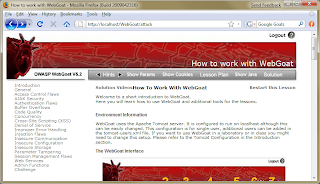
Open Firefox, go to http://localhost/WebGoat/attack. A box pops up asking for a name and password. Use guest for both the name and the password. The main WebGoat page opens. Click the "Start WebGoat" button. The "How to work with WebGoat" page opens, as shown belo

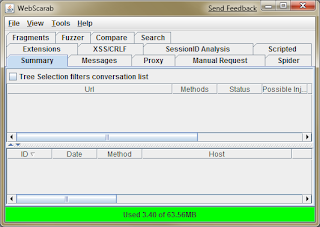
Installing WebScarabYou need WebScarab to complete the lessons. Go to this link. On the left side, click the Download link. In the first sentence in the Download section, click the word "here". Save the webscarab-current.zip file. Extract it. A folder named webscarab-current appears. Double-click the subfolder named webscarab-20090222-2217. Double-click the webscarab.jar file. Webscarab opens. This is the Lite Interface. From the menu bar, click Tools, Use Full-Featured Interface. Close WebScarab and restart it. Now you should see many more options, as shpwn below.


Subscribe to:
Posts (Atom)